> For the complete documentation index, see [llms.txt](https://academy.dnanexus.com/llms.txt). Markdown versions of documentation pages are available by appending `.md` to page URLs; this page is available as [Markdown](https://academy.dnanexus.com/cohortbrowser/cohort_browser/somatic-data-exploration.md).
# Somatic Data Exploration
Please note, the data present is intended for training purposes only. Information about the data present in this documentation is listed [here](/cohortbrowser/apollo_introduction.md).
When somatic variant data is present in your data ingestion for the cohort, the Somatic Variants tab will appear in the Cohort Browser. The goal of viewing data within the Somatic Variants tab is to view somatic mutations present in your data, and to explore variants and events for certain genomic regions. You can also compare these values within 2 different cohorts, as long as they have the same underlying database.
## Features of the Somatic Variants Tab
### Overview of the Somatic Variants Tab
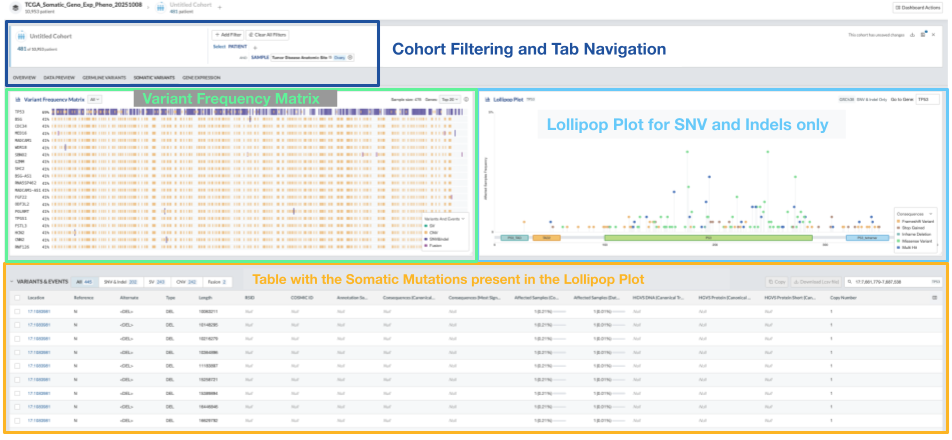
Within the Somatic Variants Tab, there are the following sections: the Variant Frequency Matrix for the Cohort, a gene Lollipop Plot with search bar by Gene Symbol or Genomic Range, and the Variants and Events Table with the somatic mutations that are present in the lollipop plot above. The tables and figures of the Somatic Variants Tab are highlighted in the figure below:
### Variant Frequency Matrix (Oncoplot)
A variant frequency matrix has the following features:
* Genes are sorted (rows of the plot) in descending order of percent of affected samples.
* Samples are sorted (columns of the plot) by the greatest number of mutated genes across all genes, independent of top mutated genes, in descending order.
* Each Variant Frequency Matrix has a color scheme by consequence.
* These features will also work while comparing cohorts.
* You can also hover over the patient tiles individually for more information.
There are several options to view these Somatic Variant Frequency Matrices. You can see an overview of all of the somatic mutations, or a particular mutation type, such as Single Nucleotide Variants and Insertions/ Deletions (SNV and Indel), Structural Variants (SV), Copy Number Variants (CNV), and Fusions.
The first figure gives an overview of the top genes that are mutated in “All” categories, as shown below:
You can select the individual Variant Frequency Matrices in the drop down menu next to the heading “Variant Frequency Matrix”.
The options of the matrices are shown in the figure below. The options are SNV and Indel (top left), SV (top right), CNV (bottom left), and Fusions (bottom right).
### Lollipop Plot
A Lollipop Plot has the following features:
* Only one gene / canonical protein can be viewed at a time
* Each lollipop will be color coded by consequence
* You are able to navigate to a particular Gene Symbol or Genomic range utilizing the search bar
* You can select (click) a single amino acid change (one lollipop) to quickly filter the somatic variants table
* Features also work while comparing cohorts
* You can also hover over the patients tiles individually for more information
### Variant Data Table
This is a tabular version of the data that you see in the Lollipop plot. You can quickly filter this data while using the lollipop plot (described above) or by filtering on any of the column headers in the table.