> For the complete documentation index, see [llms.txt](https://academy.dnanexus.com/llms.txt). Markdown versions of documentation pages are available by appending `.md` to page URLs; this page is available as [Markdown](https://academy.dnanexus.com/omics-data-catalog.md).
# Omics Data Catalog
*A license is required to have an Omics Data Catalog.*
## Finding the Data Catalog
If you are a member of an organization that utilizes the Data Catalog, the Data Catalog tab (highlighted in gold) will be visible. Select this tab to view the data catalog.Using the Data Catalog to Locate Data
## Using the Data Catalog to Find Data
Once you are viewing the Data Catalog tab, you can:
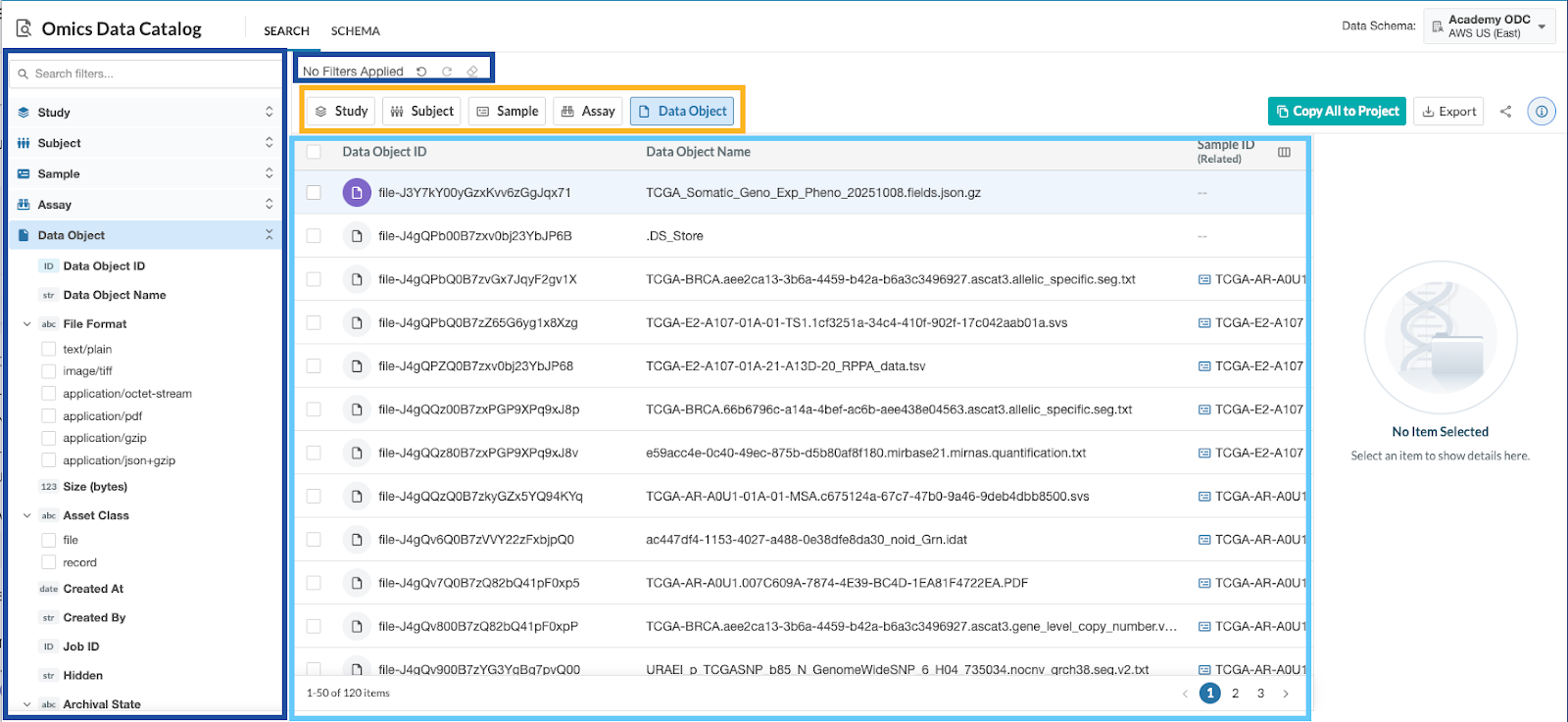
* **Select How You View the Data**: Choose to view data by entities defined in your schema (e.g., Study, Subject, Sample, Assay, and Data Object). The current viewing options are highlighted in gold. In the example provided, Data Object is the current view, indicated by a blue shade.
* **Filter the Data**: Use the panel on the left (highlighted in denim blue) to filter data by entity and category. The entities are available as drop-down menus on the panel. Select your filters of interest by checking the corresponding boxes. The active filters for Data Objects are also displayed across the top of the data catalog (highlighted in denim blue).
* **View the Data**: The main viewing area (highlighted in light blue) displays the data based on your selected entity and applied filters.
## Setting UP ODC
{% embed url="" %}
## Using ODC
{% embed url="" %}